
How to Program an Overhead Garage Door Remote
Learn how to program an overhead garage door remote, locate the Learn Button, pair a compatible transmitter, and troubleshoot common connection problems.
Quick Answer: To program an overhead garage door remote, identify the opener model, confirm remote compatibility, locate the Learn or Program button, follow the manufacturer-specific pairing sequence, and safely test the transmitter. Exact steps vary by opener model.
What Is an Overhead Garage Door Remote?
An overhead garage door remote is a wireless transmitter used to operate a compatible garage door opener. When a programmed button is pressed, the remote sends a coded signal to the receiver, allowing the controller to operate the door when the required conditions are met.
Different opener brands and generations use different wireless protocols. Similar-looking remotes are not necessarily compatible.
Understanding the Main Components of an Overhead Garage Door Opener
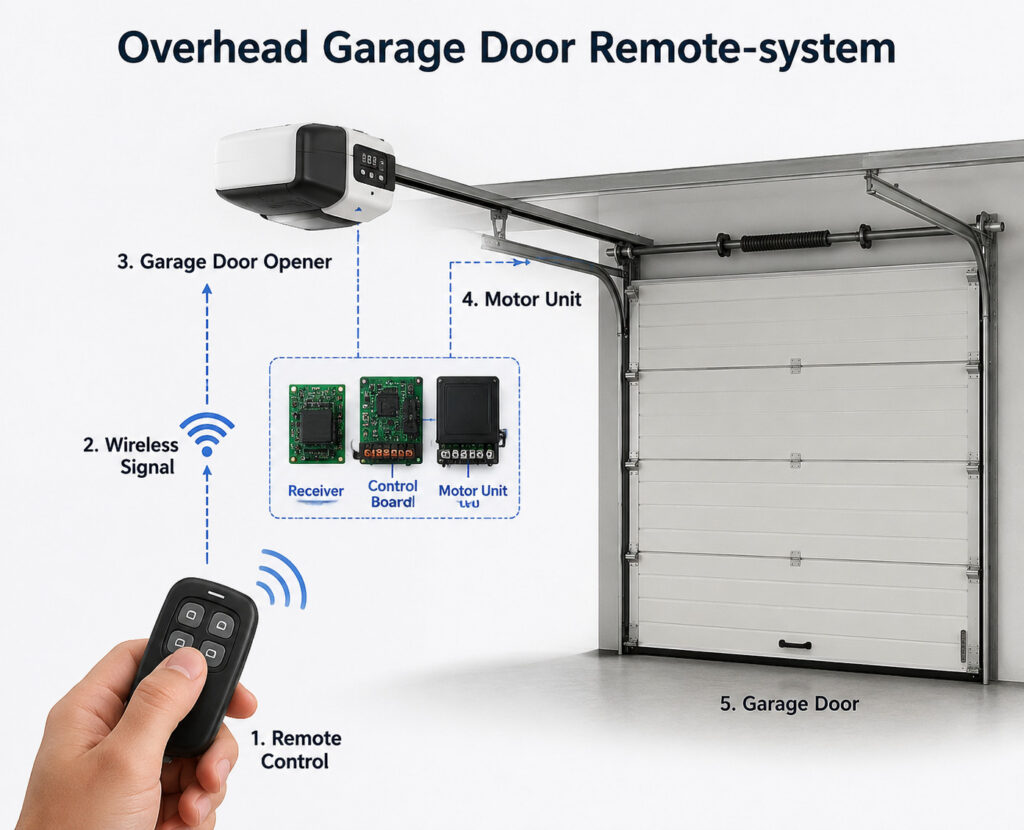
An overhead garage door remote system typically includes a handheld transmitter, receiver, control board, motor, and programming controls.
A battery-powered handheld device that sends wireless operating commands.
Receives compatible radio signals and communicates with the opener’s control system.
Processes authorized commands and coordinates the opener’s motor operation.
Operates the garage door through the appropriate mechanical drive arrangement.
How to Program an Overhead Garage Door Remote
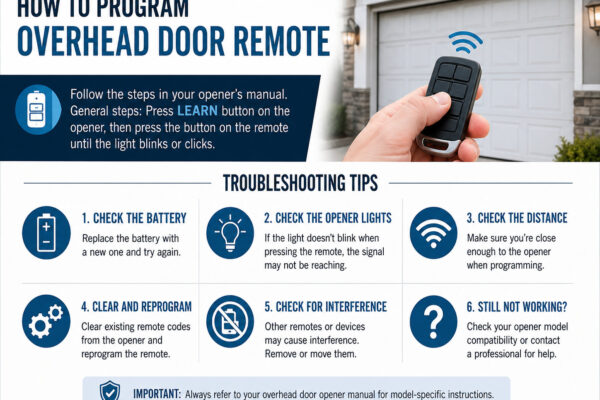
The following six steps outline the general remote programming procedure. Always refer to the official instructions for your exact opener and transmitter models.
Locate the model number on the opener and remote. Confirm compatibility with the manufacturer’s supported wireless system.
Keep people, vehicles, pets, and tools clear of the door travel path. Use appropriate access equipment if you need to reach the opener.
Find the programming control using the owner’s manual. Depending on the model, it may be on the motor housing, beneath a cover, or within a programming menu.
Follow the model-specific instructions to activate remote enrollment mode. An indicator light or display may confirm the opener is ready.
Press the selected remote button according to the manufacturer’s programming sequence. Wait for the specified confirmation signal.
From a safe position with a clear view of the door, press the programmed remote button. Confirm that the door responds normally.
Where Is the Learn Button on an Overhead Door?
The Learn Button is a programming control used by many garage door openers. It may also be labeled Learn Code, Program, or Program/Set.
Depending on the model, it may be found near the motor housing, beneath the opener light cover, or within an electronic programming interface.
On some models, holding the Learn Button can erase previously programmed transmitters and wireless keypads. Always follow the official procedure for your specific opener.
Official Overhead Door Remote Programming Instructions
Garage door remote programming procedures vary between brands and models. The following official resources provide more detailed programming guidance.
Official programming instructions and videos for supported Overhead Door opener models.
View Official Programming Instructions →Programming information for compatible Genie remote controls and wireless keypads.
View Genie Programming Support →How Does an Overhead Garage Door Remote Work?
When the remote button is pressed, the transmitter sends a coded wireless signal to the opener’s receiver. The control board checks whether the signal is authorized. If operating conditions permit, the motor activates the door drive system.
Some systems use rolling-code technology, while others use different manufacturer-specific communication methods. Compatibility depends on the opener model, receiver, frequency, and coding protocol.
How to Reset or Reprogram an Overhead Garage Door Remote
Reprogramming a remote and clearing stored transmitter memory are different procedures. When adding another compatible remote, deleting other paired devices is usually unnecessary.
Reprogram an Existing Remote
Check the remote battery and verify compatibility. Follow the manufacturer’s enrollment procedure to pair the remote again.
After programming, test the remote from a safe location. If the opener does not respond, review the model-specific instructions before attempting further changes.
Clear Existing Remote Codes Only When Necessary
Some opener models allow stored remote codes to be deleted when a transmitter has been lost or unauthorized access is suspected.
Clearing stored memory may also disconnect other remotes and wireless keypads. Only perform this operation when the manufacturer’s instructions require it.
Do not assume that holding the Learn Button is the correct reset method for every opener. Some models use a long press to erase their stored memory.
Common Overhead Garage Door Remote Problems
If overhead door remote programming fails, check compatibility, battery condition, and the programming sequence before changing opener settings.
| Problem | Possible Cause | Recommended Check |
|---|---|---|
| Remote does not respond | Weak battery or damaged transmitter | Inspect the remote and battery. |
| Remote will not program | Incompatible model or incorrect sequence | Verify compatibility and official instructions. |
| Remote has short range | Battery condition or interference | Check battery and nearby interference. |
| Garage door does not operate | Opener or mechanical system fault | Check fault indicators and seek qualified service. |
| Other remotes stop working | Stored memory may have been erased | Review the manufacturer’s enrollment procedure. |
If the door moves abnormally or a safety function fails, stop using it and arrange appropriate servicing.
Can an Overhead Garage Door Remote Be Used for Industrial Doors?
Some industrial sectional door systems support wireless remote control, but residential garage door remotes are not automatically compatible with industrial door operators.
Compatibility depends on the selected receiver, control panel, coding system, and safety requirements. Industrial installations may also use push-button stations, access-control devices, or automation interfaces.
| Feature | Residential Garage Door | Industrial Sectional Door |
|---|---|---|
| Application | Residential garage access | Warehouses and industrial buildings |
| Wireless System | Specific opener and transmitter | Selected industrial receiver and operator |
| Controls | Remote, wall switch, keypad | Remote, push button, access control, automation |
| Safety | Residential opener requirements | Industrial and site-specific safety assessment |
SEPPES Automatic Sectional Door Solutions
SEPPES manufactures customized industrial sectional doors for factories, warehouses, logistics centers, and commercial industrial facilities.
Selected configurations can include powered operation, compatible wireless remote control, insulated panels, vision windows, and appropriate safety equipment. The exact configuration should be confirmed against the project requirements.
Frequently Asked Questions
How do I program an overhead garage door remote?
Identify your opener model, confirm remote compatibility, locate the Learn or Program control, follow the manufacturer’s pairing sequence, and safely test the device.
Where is the Learn Button on an overhead door opener?
The location depends on the model. It may be on the motor housing, behind a light cover, or within a programming menu.
Why is my overhead door remote not programming?
Possible causes include an incompatible remote, weak battery, incorrect programming sequence, signal interference, or opener control fault.
Can a universal remote work with any garage door opener?
No. Universal remotes support specified opener models and wireless coding systems, not every garage door opener.
Will reprogramming erase other remote controls?
Normal enrollment does not necessarily erase existing remotes. Memory deletion is a separate procedure on many opener systems.
Can SEPPES industrial sectional doors use remote control?
Selected SEPPES configurations support compatible wireless remote control. The operator, receiver, and required safety functions must match the project.
Need an Automatic Industrial Sectional Door?
SEPPES provides customized industrial sectional doors for factories, warehouses, and logistics facilities. Our engineering team can review your requirements and recommend a suitable door configuration.
For a project quotation, please provide: